Snapchat Planets Order & Meanings 2026 —
Find Out Which Planet You Are on Their Friend Solar System
This is an estimate. Your real position also depends on how active other people are with them — only Snapchat's algorithm can see that.
Do I need Snapchat+ to see planets?
Yes — the Friend Solar System is a Snapchat+ feature. You need the subscription to see your planet on someone's profile; they do not need it. Your own planet on their profile exists either way, they just can't see it without Snapchat+.
Have you noticed a planet badge on your friend's profile? This cool feature is the Snapchat planets system for Plus subscribers. It shows exactly where you stand in their Best Friends list. A gold ring around the badge means you are super close. You are the Sun in your own friend solar system. The app lists Snapchat planets in order from Mercury to Neptune. This ranking changes based on how much you snap and chat. Read on to learn what every planet on Snapchat means.
Watch Video: Snapchat Solar System and Planets Explained in Order
What Are Snapchat Planets? (Friend Solar System Explained)
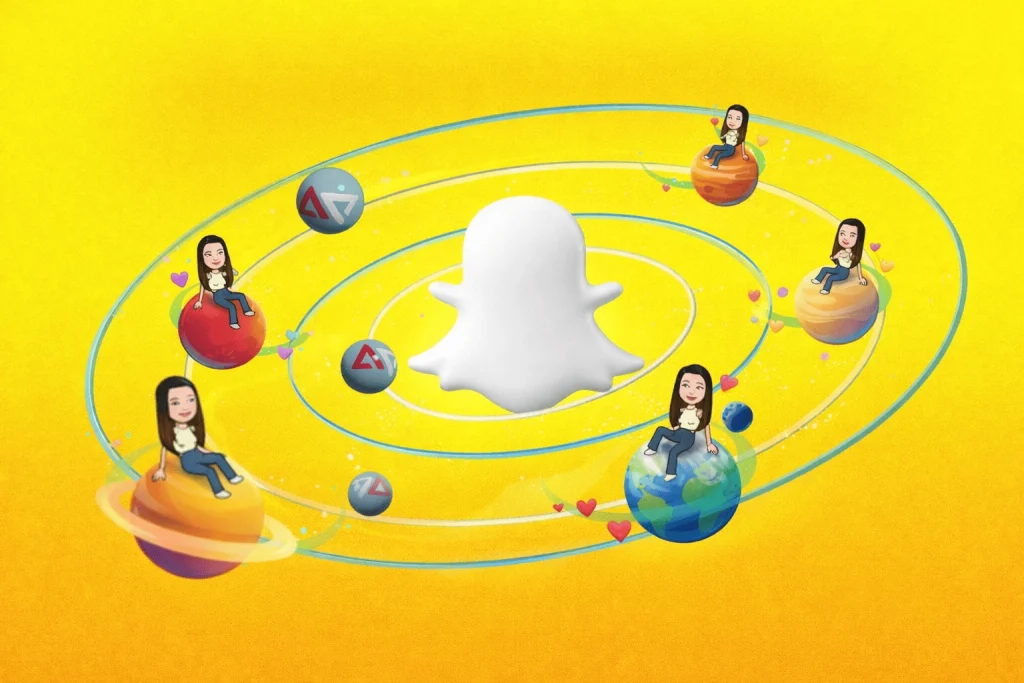
Snapchat Planets are a playful feature for Snapchat Plus users. Instead of a simple list, the app shows a mini solar system. You are the sun, and your top eight friends become planets. This friend’s solar system makes it easy to see who you connect with most.
Each planet is based on how often you send snaps, chat and call; these are the planets on Snapchat. The closer a planet is to your sun, the higher it ranks as a friend. To check your planet, open your friend’s profile and tap the Best Friends badge. You both need a Snapchat Plus subscription for planets to appear.
Mercury means your number one best friend, and Neptune shows the least interaction. There are eight planets in total, matching the order of our real solar system. This feature is about consistent connection, not how many followers you have. When you stop chatting or other friends get more active, your planet can drift to a new spot.
What Is Snapchat Plus & Snapchat Plus Planets?
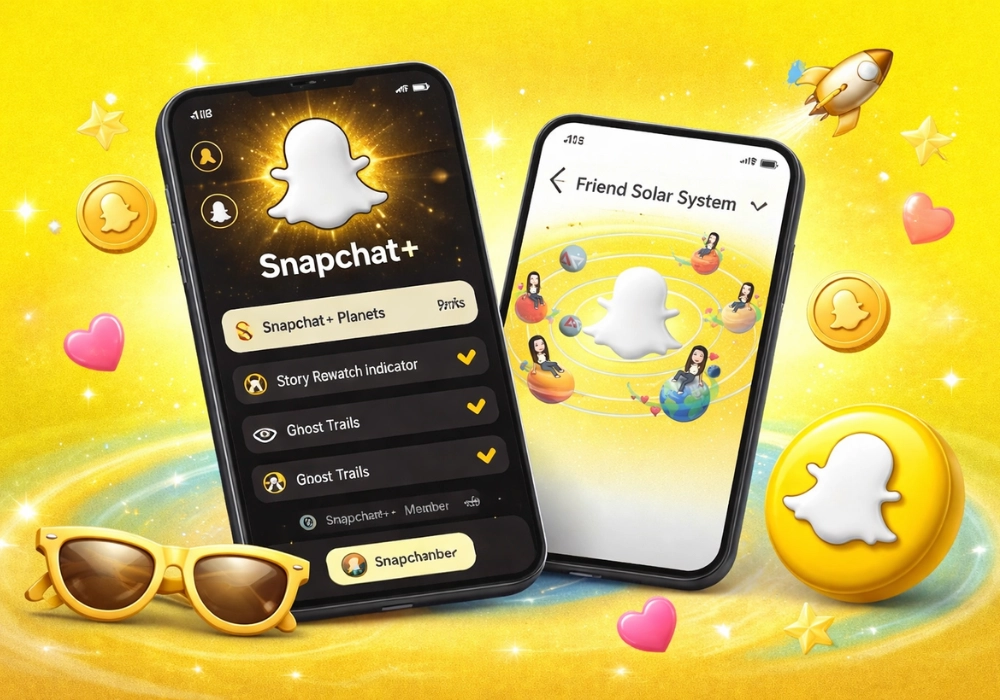
Snapchat Plus is a premium subscription built for power users. It gives early access to experimental features, deeper insights and customisation. Perks include extra icons, chat wallpapers and fun experiments before they roll out to everyone. For many fans, the highlight is the Snapchat Plus Planets feature, which visualises friendships.
In this friend solar system, you are the sun and eight friends orbit as planets. Each planet ranks friends based on real interaction data like snaps, chats and calls. Mercury shows your number one best friend, and Neptune shows the least active connection. People call this system Snap Plus planets or Snapchat + planets, but it all refers to the same exclusive ranking tool.
You can only see your planets when you have an active Snapchat Plus subscription. Both you and your friend need to subscribe and enable the feature in settings to view the solar system. Besides the planets, subscribers can explore features like priority story replies, pinning a BFF, and story rewatch indicators. If you decide the planets aren’t for you, it’s easy to turn them off or cancel at any time.
The "9th Planet" Rumor: Is There a Pluto on Snapchat?
A massive rumor on TikTok and Reddit among Gen Z users claims there is a hidden 9th planet for ultimate best friends or if you reach a massive snap score. This is completely false. The Friend Solar System strictly stops at Neptune (your 8th friend). Any glitches showing weird badge behaviors are just bugs, not a secret Pluto. The Snapchat interface is designed for exactly eight spots, mirroring the real solar system.
What Is the Friend Solar System on Snapchat?
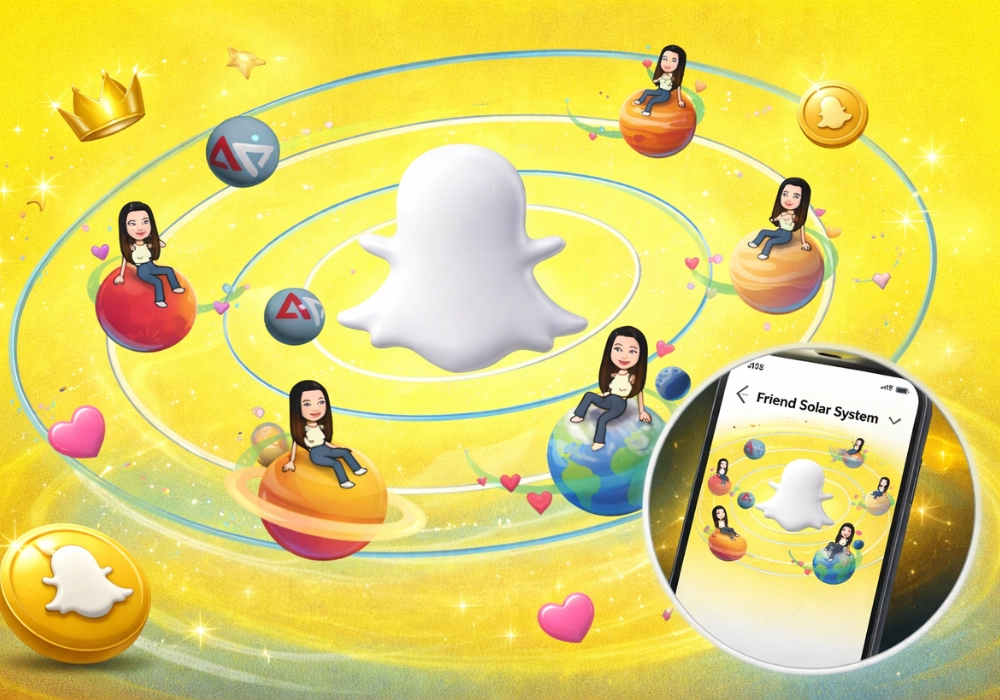
The friend solar system Snapchat is the official name of the planet feature. When you turn it on, Snapchat makes you the Sun and your eight closest friends orbit around you. Each planet’s position is based on how often you send snaps, chat or call. Instead of a list, this Snapchat solar system feature shows friendship as a mini galaxy.
In the planet’s Snap feature, Mercury is your number one best friend, and Neptune is number eight. The planets appear in the same order as the real solar system. The closer a friend’s planet is to your Sun, the more you interact with them. These orbits can change because Snapchat recalculates rankings based on recent snaps and chats.
Your friend’s solar system Snapchat is private; nobody else can see it. To check your position in someone else’s system, open their profile and tap the Best Friends or Friends badge. First‑time subscribers must enable the Snapchat solar system feature in settings because it’s off by default. This makes the planets’ Snap tool optional for users who don’t want to rank friends.
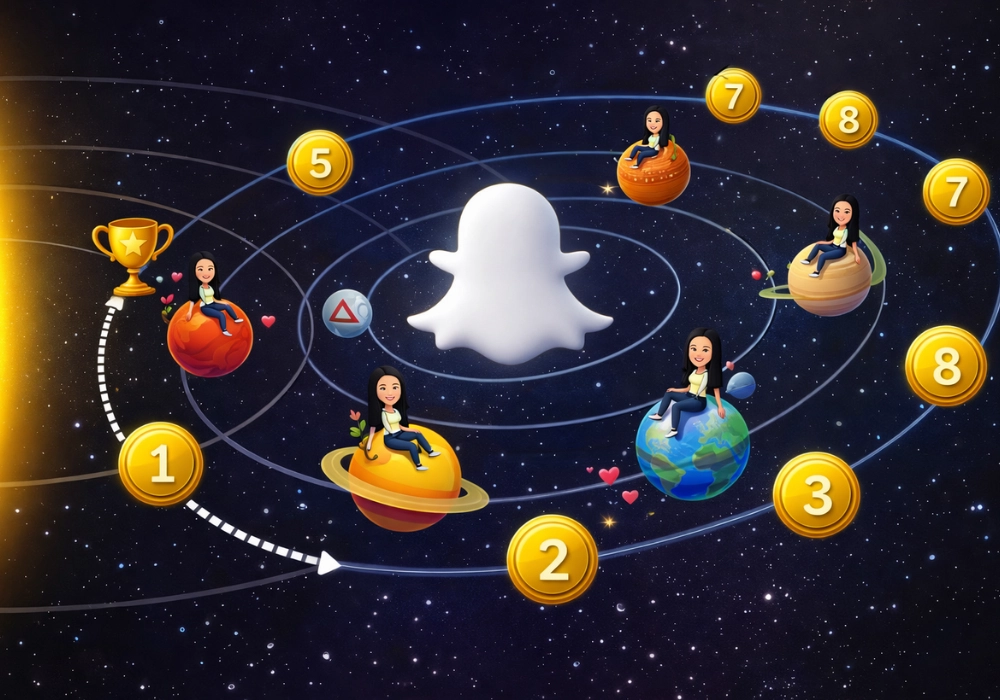
How Snapchat Planets Work (Ranking Algorithm Explained)
The how Snapchat planets work feature is not a random decoration. It uses real signals to rank your friends and follows a strict ranking algorithm. Snapchat tracks specific metrics like your Snapstreaks, snap frequency, chat consistency, story replies, and reply speed to decide who becomes Mercury, Venus, or Neptune in your solar system. Because the algorithm relies on this two-way engagement, your friendmoji planet ranking can change dynamically if your activity does.
The Snapchat planets ranking order is based on your interaction patterns. Friends you talk to daily are assigned closer planets like Mercury or Venus, while less active contacts show up farther away. As you spend more time chatting, snapping, and watching stories, your planets move closer to you. If you stop interacting, your planet drifts outward until others take their place. Snapchat updates rankings automatically in its Augmented Reality (AR) interface, so you never need to do anything manually. By understanding this logic, you can easily adjust your engagement to climb the ranks.
Snapchat Planets Meaning: What Each One Says About Your Friendship
The planet tells you your position in someone's list — not the quality of the friendship.
People usually search for the planets meaning because they have seen a badge on someone's profile and want to know where they stand. The short answer is simple: a planet is a ranking, nothing more.
Closer to the sun
You two have been snapping, chatting or calling a lot recently. Mercury is the most active connection of all eight.
Further out
The contact has slowed down. Snapchat does not know whether this is your oldest friend or someone you met last week.
What the Planets Do Not Mean
Being Neptune does not mean someone dislikes you, and being Mercury does not mean you are their favourite person. The system only counts snaps, chats and calls over recent weeks.
A close friend who prefers phone calls or meeting in person can easily sit at the outer edge of your solar system — and that says nothing about how close you actually are.
Snapchat Planets in Order Detail (Planet-by-Planet Breakdown)
Snapchat’s Friend Solar System turns your top eight friends into a galaxy of planets arranged in the Snapchat Planets in Order. You are the Sun, and each friend orbits around you in the same sequence as our real solar system. The closer a friend’s planet is to you, the more often you snap and chat with them, which decides their position in the order. This playful system adds excitement and creativity to your friend list, making relationships feel like a fun cosmic adventure.
- Mercury
- Venus
- Earth
- Mars
- Jupiter
- Saturn
- Uranus
- Neptune

Mercury – 1st on Your BSF List (Best Friend)
Mercury is your best friend on Snapchat. The planet appears bright red and is covered with red hearts and sparkles. This shows that you and this friend exchange the most snaps and messages. It’s the closest planet to the Sun, representing the strongest connection.

Venus goes to your second closest friend. The planet has a soft beige or light brown colour with pink, yellow and blue hearts around your Bitmoji. You still interact often, but slightly less than with Mercury. Venus signals a very strong bond that just misses the top spot.
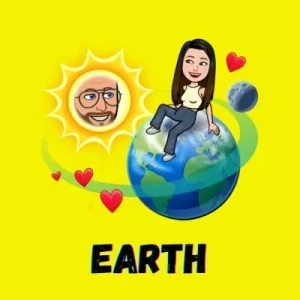
Earth – 3rd on Your BSF List (Strong Friend)
Earth is for a friend who ranks third in your Best Friends list. It looks like a real Earth with blue and green colours, hearts, stars and a small moon. This friend has steady, reliable interactions with you. They’re consistently at the top of your social universe. If you are asking what Earth means on a snap BSF list, it means you are the third closest friend on that person’s list. You are high up, just behind Mercury and Venus.
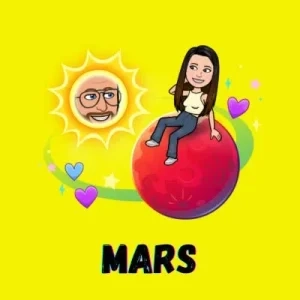
Mars shows a friend you chat with regularly but not daily. The planet is bright red or orange with purple and blue hearts and tiny stars. It represents a fun, lively connection with lots of energy. This friend is your fourth closest companion.
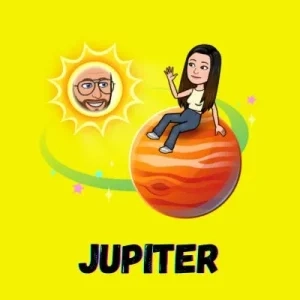
Jupiter – 5th on Your BSF List (Casual Friend)
Jupiter is assigned to your fifth friend. The planet is large and orange with swirl patterns and colourful stars. You exchange snaps and comments occasionally, maybe weekly. It signals a casual friendship with moderate interaction.
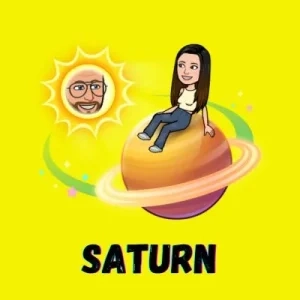
Saturn marks a friend you contact every once in a while. The planet is yellow with rings and small stars, but there are no hearts. This indicates limited interaction that’s still friendly. Saturn shows you’re connected, but not closely tied.

Uranus goes to your seventh-best friend. The planet appears light blue or green with minimal decorations and no hearts. You might reply to a story or send a snap occasionally. It reflects a distant friendship rather than a close bond.
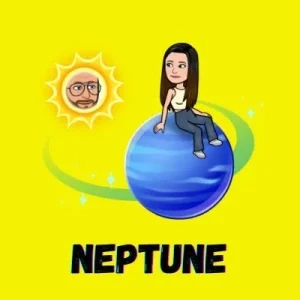
Neptune – 8th on Your BSF List (Least Contact)
Neptune represents the friend you interact with the least among your top eight. The planet is deep blue with a simple design and no hearts. Conversations may be weeks or months apart. Being on Neptune means you’re still on the list, but contact is rare.
Snapchat Planets Numbered: 1 to 8
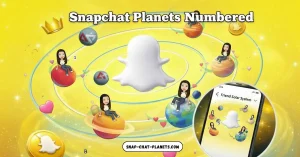
If you only want the numbers, here they are. Mercury is 1, Venus is 2, Earth is 3, Mars is 4, Jupiter is 5, Saturn is 6, Uranus is 7 and Neptune is 8. The lower the number, the closer the friend. There is no planet 9 — the list stops at eight, the same as the real solar system without Pluto.
Friends Solar System Classification Chart (Snapchat BSF List Planets)
The Snapchat BSF list planets feature shows your best friends in a visual solar system instead of a basic list. With the Snapchat planets bsf list, your top eight friends are ranked as planets based on how often you snap, chat and interact with them. This Snapchat BSF planets chart makes it simple to understand your friendship levels at a glance.
| BFF Planets Name | Description |
|---|---|
Mercury |
Represents your 1st best friend with the highest interaction. |
Venus |
Represents your 2nd best friend, whom you interact with very often. |
Earth (Blue Planet) |
Represents your 3rd best friend with strong, consistent engagement. |
Mars (Red Planet) |
Represents your 4th favourite friend you chat with regularly. |
Jupiter |
Represents your 5th-best friend with moderate interaction. |
Saturn |
Represents your 6th-best friend you talk to occasionally. |
Uranus (Green Planet) |
Represents your 7th dearest friend with low interaction. |
Neptune |
Represents your 8th closest friend with the least interaction among the top eight. |
Best Friends Badge vs Friends Badge on Snapchat
Snapchat+ shows special badges on your friends’ profiles to explain the Friend Solar System. You’ll see either a Best Friends badge or a Friends badge when you open their profile. These labels reveal whether your connection is mutual or one‑sided. Understanding the badges helps you interpret the planets and avoid confusion.
| Badge Type | Meaning & Interaction Level |
|---|---|
Best Friends Badge |
Indicates a mutual connection—both users are in each other’s top eight. The badge has a gold ring and appears on the profile of users you interact with the most. Tapping it shows your planet in their solar system, confirming you’re both ranked highly. |
Friends Badge |
Shows a one‑sided connection—you are in their top eight, but they aren’t in yours. This badge looks similar but without the mutual indicator, and it explains why planets can appear without reciprocity. Tapping it still reveals your planet position, even if they don’t show up in your system. |
In short, badges and the Snapchat planets order tell you how close your friendships really are. A Best Friends badge means both of you are in each other’s inner circle and rank highly in the planets system. A Friends badge means only one of you counts the other in their top eight, which affects where you appear in the overall order.
How to Enable or Disable Snapchat Planets (Step-by-Step)
Snapchat Plus planets are off by default – Snapchat keeps the Friend Solar System turned off so that users can choose whether to see rankings. You need a Snapchat+ subscription to access or adjust the planets.
Steps to enable Snapchat planets:
- Open the Snapchat app and tap your Bitmoji icon in the top‑left corner.
- In your profile, select the Snapchat+ banner under your name.
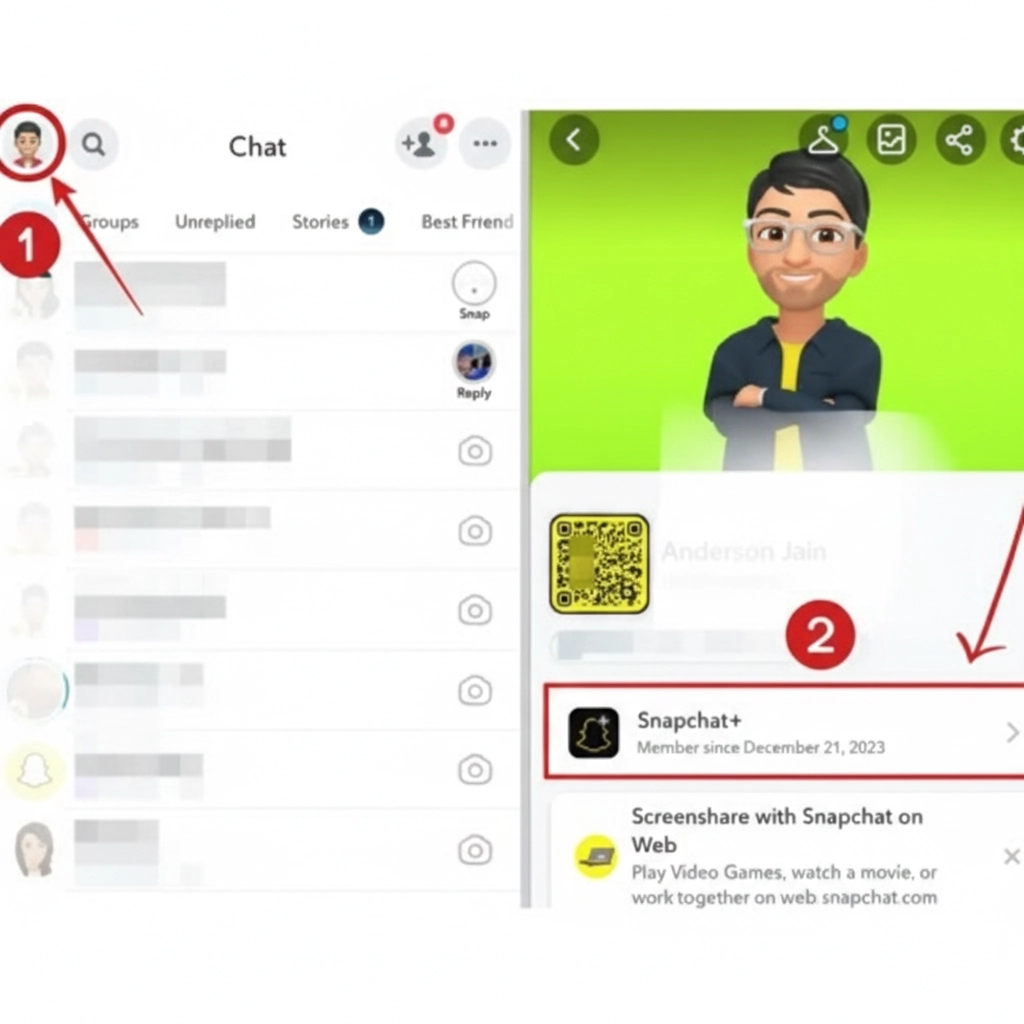
- Scroll through the feature list until you find the Friend Solar System option.
- Toggle this option on and confirm to enable Snapchat planets; planets will then appear on eligible friends’ profiles.
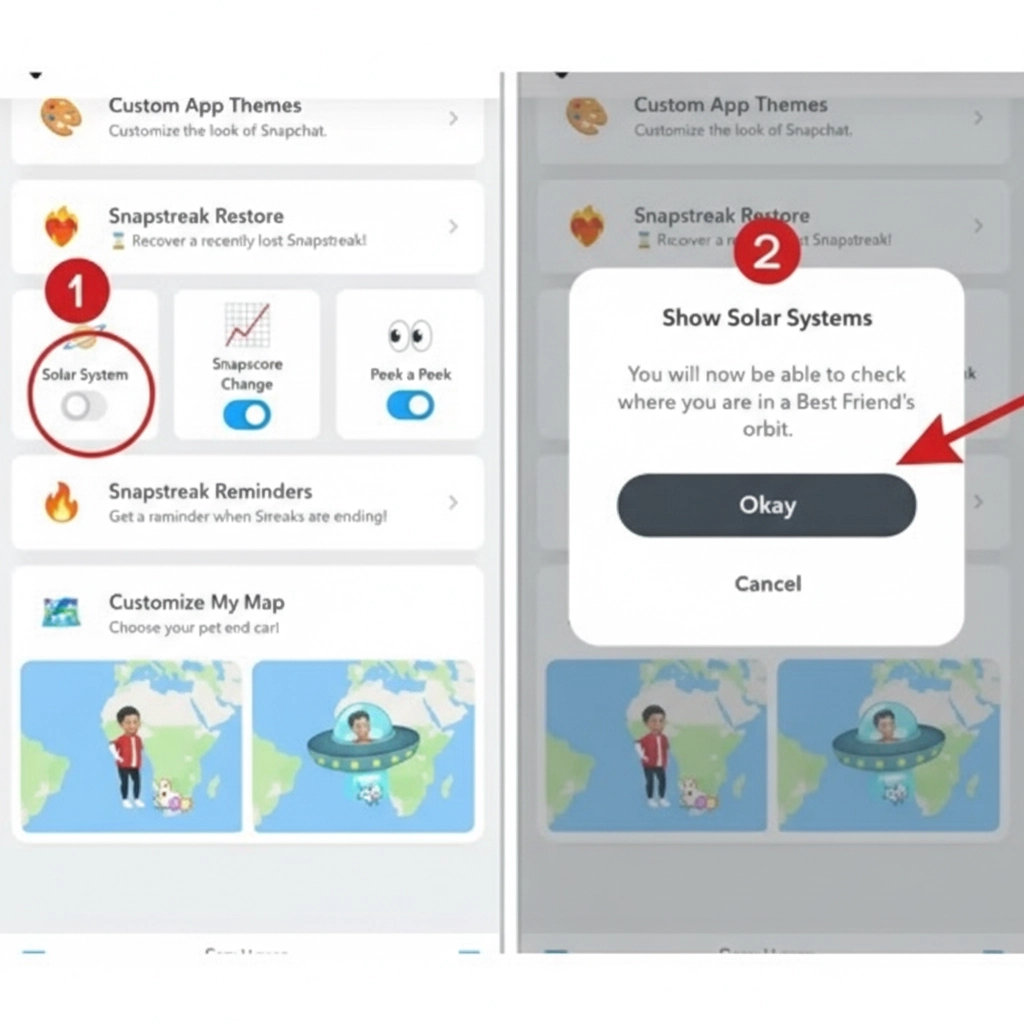
Steps to disable Snapchat planets:
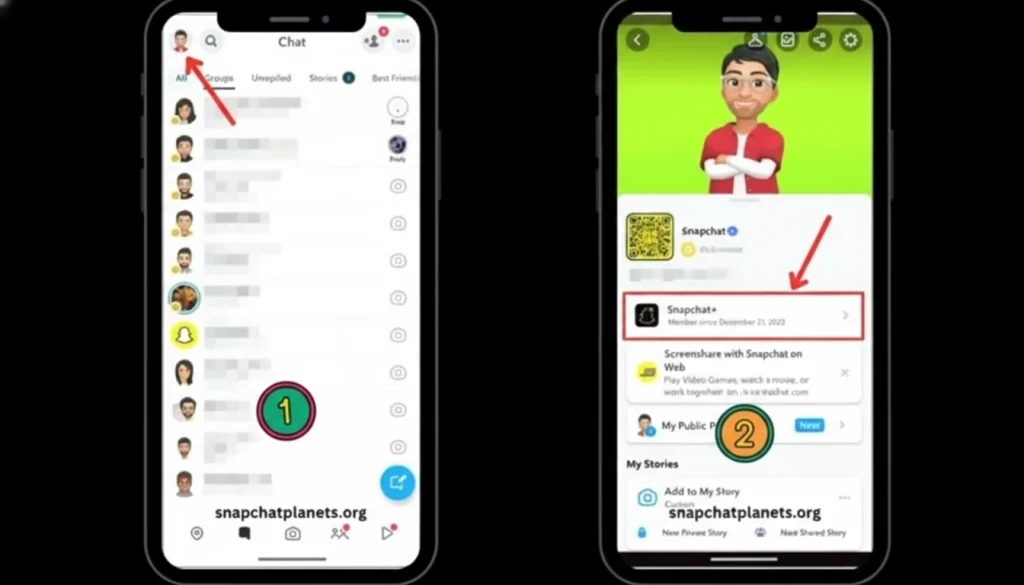
- Open Snapchat again and tap your Bitmoji icon.
- Go to the Snapchat+ section of your profile.
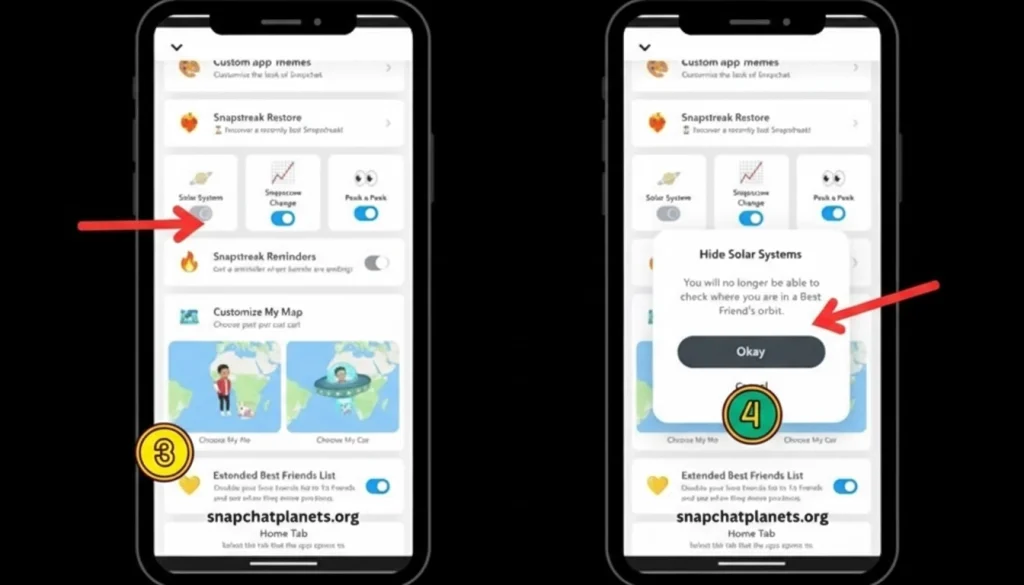
- Scroll to Friend Solar System in the settings.
- Toggle the switch off and confirm to turn off the Friend Solar System. Once disabled, planets will no longer be visible even if you remain subscribed to Snapchat+.
How to Check Your Planet on a Friend’s Snapchat Profile
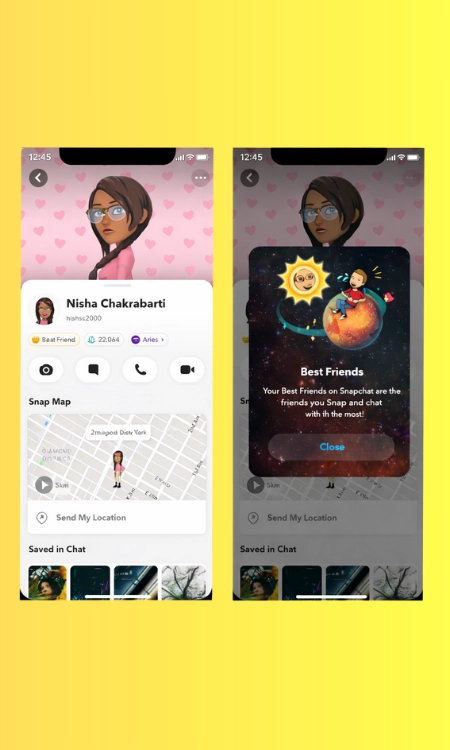
If you’re thinking, “What planet am I on, Snapchat?” you can find the answer in your friend’s profile. This check only works if you and your friend both have Snapchat Plus and the Friend Solar System enabled. Once you meet these conditions, Snapchat shows your planet position as soon as you tap the right badge.
Step‑by‑Step: Check Your Snapchat Planet Position
- Open Snapchat and go to your Chats or Friends list.
- Tap the friend whose planet ranking you want to check.
- Open their profile by tapping their Bitmoji.
- Look for the Friends or Best Friends badge.
- Tap the badge; Snapchat will show your planet and ranking.
This quick process tells you how to check your planets snapchat without any guesswork.
Can You See Snapchat Planets Without Snapchat Plus?
Many people ask, “Can you see Snapchat planets without Snapchat Plus?” The simple answer is no. The Friend Solar System is a premium feature, and you must subscribe to Snapchat Plus to use it. Below, we explain why there’s no permanent free access, how a Snapchat Plus free trial works and why the friend’s account myth doesn’t unlock the feature.
No Permanent Free Access
Snapchat planets are only available with an active Snapchat Plus subscription. Without Plus, the planets and ranking system are completely hidden. In other words, you cannot permanently access Snapchat planets without Plus or any other type of subscription.
Snapchat Plus Free Trial
Snapchat sometimes offers a free trial for new users. During this trial, you can explore all premium features, including the planets system, at no cost. However, once the trial ends, access to the planets feature is removed unless you subscribe. This means there is no permanent free access; the trial is only a temporary way to see planets without paying.
Friend’s Account Myth Explained
Some users think they can view the planets by logging in through a friend’s account, but this is a myth. Even if you look at a friend’s profile, you won’t unlock the planets for yourself. To see your planet ranking, you need your own Snapchat Plus subscription and the Friend Solar System enabled on your account.
Want to climb the ranks? Discover how to boost your position in Snapchat Planets with your closest friends.
Why Snapchat Planets Are Not Showing (Common Problems & Fixes)
If your planets vanish or never appear, it’s usually a simple settings or subscription issue. This section explains the most common reasons Snapchat planets are not showing and how to fix them.
Friend Solar System Is Turned Off
Sometimes planets disappear simply because the friend solar system is turned off. Even with Snapchat Plus, you must manually enable the feature in your settings to see planets. To fix it, open Snapchat+, find the Friend Solar System toggle and turn it on.
Snapchat Plus Subscription Ended
If your Snapchat Plus subscription ended, the planets feature will vanish. The Solar System is a premium perk, so it disappears when you lose access to Plus. Renew your subscription or update your payment to restore the planets.
Temporary App Glitches
Your planets may also be missing due to temporary app glitches. Slow internet, app bugs or outdated versions can block the feature. Restarting or updating Snapchat often fixes these problems.
Friend’s Privacy or Subscription Settings
Sometimes a friend’s planets disappear because of their privacy or subscription settings. If they turn off the Solar System or cancel Snapchat Plus, you won’t see their planet anymore. Ask them to re‑enable the feature or resubscribe if you want to view their planet again.
We also explain common lingo, like what jw mean on Snapchat or the definition of hru mean on Snapchat.
Related Blogs


Social & Emotional Impact of Snapchat Planets
Snapchat’s planets feature has sparked debate because some users worry it creates jealousy and stress. Reports of teens feeling anxious when they discovered their rank made the feature seem like a snapchat planets controversial tool. In response to these Snapchat planets’ mental health concerns, Snapchat turned the Friend Solar System off by default, so only people who want it will see it.
The social and emotional impact of Snapchat planets comes from comparing yourself to friends. Snap admits the feature can feel bad if you realise you aren’t as close to someone as you thought. Turning off planets by default helps reduce pressure and keeps friendships from feeling like a competition.
Snap also points out that the Solar System is optional and private, only visible to the user. They hope this balance lets fans enjoy the planets without upsetting others. The company plans to keep evaluating the feature to ensure Snapchat stays a positive space and limits any negative social or emotional impact.
Tips to Improve Your Snapchat Planet Ranking
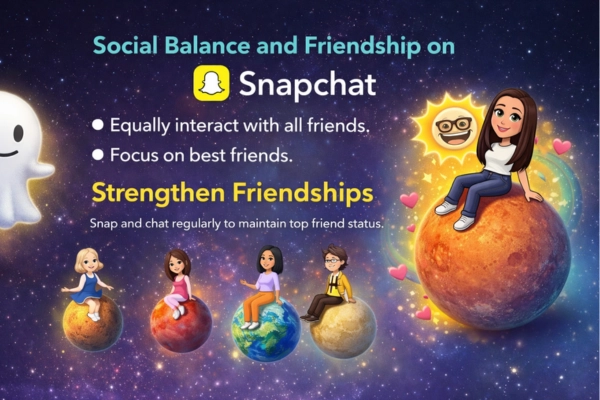
Snapchat ranks your friends based on how actively you interact with them, so your position in the Snapchat planet order isn’t random. The system is dynamic, planets move closer or farther depending on how often you send snaps, chat or react to stories. If you want to improve your Snapchat planet ranking, small changes in your habits can make a big difference.
Stay Active in Chats
Being engaged in chats is just as important as snapping. Regular conversations keep interactions steady and can improve your Snapchat planet ranking over time.
Engage With Stories
Watching a friend’s story and replying or reacting strengthens your connection. These little actions add up and contribute to a higher ranking in the Snapchat planets order.
Use Voice or Video Calls
Occasional voice and video calls count as meaningful interactions on Snapchat. Using these features signals a stronger bond and helps your planet drift closer to the Sun.
Send Snaps More Regularly
Frequent snap exchanges are one of the strongest signals Snapchat uses to measure closeness. Sending snaps consistently boosts your interaction level and helps you move up in the Snapchat planet ranking.
Be Consistent Over Time
Small daily interactions are more effective than sporadic bursts of activity. Staying consistent keeps you near the top of your friend’s snapchat best friends planets list.
Snapchat Planets in Other Languages
The Friend Solar System works the same way everywhere, only the name changes.
– German and Dutch: Planeten
– French: planètes (classement means the order or ranking)
– Swedish, Danish and Norwegian: planeter
– Spanish: planetas
The planet order is identical in every language: Mercury first, Neptune eighth. If you switched your Snapchat language and the planets look different, it is only the label that changed, not the ranking.
Conclusion
Snapchat’s Friend Solar System, often called Snapchat planets, turns your best friends list into a tiny galaxy. You are the Sun, and up to eight friends orbit around you as planets. Closer planets mean you snap or chat with those friends more often. This fun feature is private and only comes with a paid Snapchat+ plan.
The Solar System can make some people worry about their Snapchat planet order, so Snap keeps it off by default. You can turn it on in settings and use simple habits like regular snaps and chats to move friends closer in your friend solar system, Snapchat. The planets update automatically as you talk to people, so your rank can change. Treat Snapchat Plus planets as a fun way to celebrate friendships, and turn it off if it ever feels bad. Stay updated with modern features by exploring what is Snapchat Spotlight and how to share your profile via a Snapchat QR code.
Frequently Asked Questions
What is Snapchat’s Friend Solar System feature?
It’s an optional Snapchat friend solar system that shows your top friends as planets orbiting you and is only visible to you.
How many planets are in the Snapchat Solar System, and what order are they in?
There are eight Snapchat planets in order from Mercury to Neptune, mirroring the real solar system.
Is the Snapchat Planets feature free?
No; snapchat plus planets require a paid Snapchat+ subscription, which costs around $3.99 per month.
How do I see which planet I am on in a friend’s profile?
To find what planet I am on Snapchat, open your friend’s profile and tap the Best Friends or Friends badge.
How does Snapchat determine planet rankings?
The Snapchat planet ranking is based on how often you snap, chat and engage with a friend.
What do the individual planets signify?
Each planet has a specific Snapchat planet meaning, with Mercury as your closest friend and Neptune as the eighth.
Can I view Snapchat planets without Snapchat Plus?
There is no permanent way to access Snapchat planets without Plus, though a free trial may provide temporary access.
Why aren’t my Snapchat planets showing?
Snapchat planets not showing may be due to the feature being turned off, a lapsed subscription or temporary app glitches.
Can I turn off the Snapchat Planets feature?
Yes, you can disable Snapchat planets by toggling off the Friend Solar System in Snapchat+ settings.
What happens if my Snapchat Plus subscription ends?
When a Snapchat Plus subscription ends, the planets disappear until you renew your subscription
What are the planets on Snapchat, and how do they rank your friends?
The planets on Snapchat are a Snapchat+ feature that turns your eight closest friends into planets orbiting you, the Sun, and the closer a planet is to your sun, the more often you snap, chat or interact with that friend.
What are Snapchat best friend planets?
Snapchat best friend planets are part of Snapchat+, where your top eight friends are shown as planets around you, with closer planets representing friends you interact with the most on Snapchat.
What is a BSF list on Snapchat?
BSF list is another name for your Friend Solar System. It shows your top eight best friends as planets, from Mercury at number one to Neptune at number eight.
What is Earth on a snap BSF list?
Earth means you are the third closest friend on that person’s list, just behind Mercury and Venus.
What are Snapchat planets numbered?
Mercury is 1, Venus 2, Earth 3, Mars 4, Jupiter 5, Saturn 6, Uranus 7 and Neptune 8. There is no ninth planet.
What do the planets mean on Snapchat?
Each planet shows your position in someone’s best friends list. Closer to the sun means more recent snaps, chats and calls — not a stronger friendship.
Why does my BSF list keep changing?
Snapchat recalculates the list from recent activity. If you snap someone less for a couple of weeks, their planet moves outward and a more active friend takes that spot.